While working on a Python project, I ran into an import error.

Additional unfair issue found on 10/13 -> The issue may occur when creating an instance rather than in the import section (the yellow-underlined part in the image below).

-> Similarly, you need to specify in the init.py file that the class I created is a module.
Why does this happen?
One-line summary: This problem occurs because the module BM25Reranker is not recognized as a package.
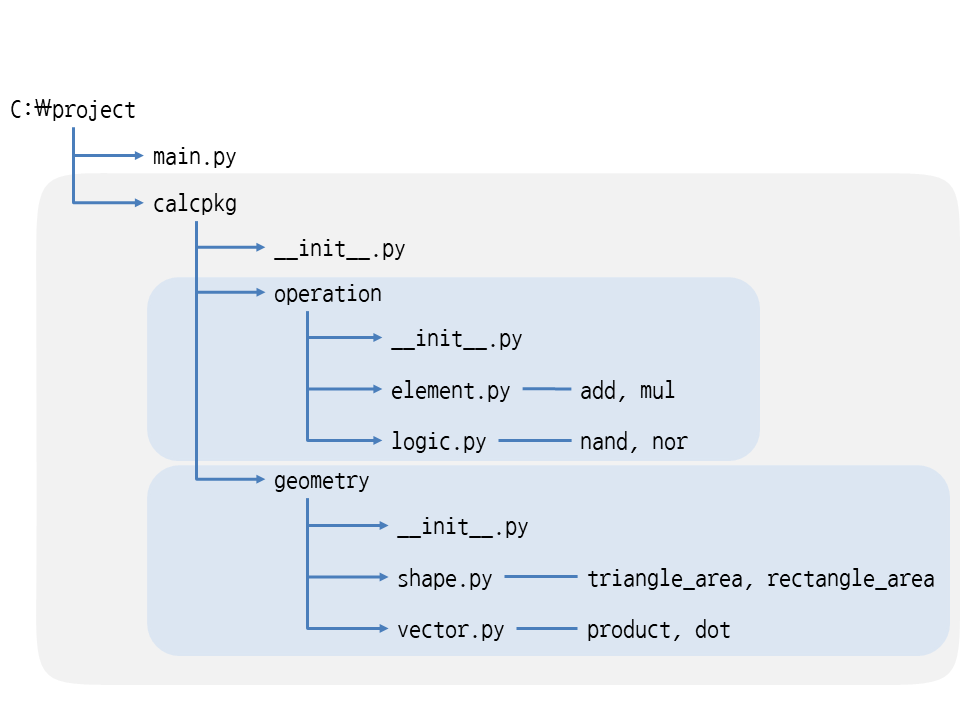
The init.py file, which should indicate that the directory [RAGchain.reranker] is part of a package, must be present inside the directory. However, if the directories included in the package, such as BM25reranker, do not contain an init.py file, they will not be recognized as packages.
Also, in the following situation, the init.py file exists and the existing rerankers are present, but an error occurs because the newly created bm25 reranker has not been added to it.
In fact, even if only the file is added, the directory is automatically recognized as a package. However, in this case, where it is not recognized properly, define the module to import in init.py as follows.
Solution
Define the module to import in init.py as follows.
from RAGchain.reranker import BM25RerankerThe example image below should make this easier to understand.
Additional note
If you define a variable in init.py, it becomes a variable shared throughout the package and can be imported and used by different modules.
Starting with Python 3.3, a package is recognized even without an init.py file. However, it is recommended to create an init.py file for backward compatibility.
References