What I learned on 10/6 (It is effective to study by looking at the code and asking what the code means)
- What is the difference between an object and an instance? => An object is what will be implemented in the software world, a class is the blueprint for implementing it, and an instance is the entity implemented in the software world according to that blueprint. You can think of the two as similar concepts. However, you should at least know that a class is a different concept from an object or an instance.
- What is object-oriented programming?
=> A logical methodology for organizing code into logic (a visual + logical code structure)
- What is a class?
=> A job or role that contains items (variables within the class) and skills (methods) / tools and actions
- What is a constructor?
=> Code that is always executed from the very beginning when a class runs
- What is an instance (object)?
=> Things produced from a class
- instance = ClassName(parameter) -> What are the parameters placed next to the class?
=> The constructor’s parameters
- What is a field? => In a class, the variables belonging to the class are called member variables or fields.
- What is self? => Oneself; it represents the instance itself when creating an instance (in fact, it is still difficult to define)
Additional study on 10/20
=> Since it is a parameter that receives an instance, every method starts by receiving an instance as a parameter. If this is missing, an error appears saying that one more argument is expected.
A nice explanation
-> At the link above, you can confirm that the memory where f.func2() is stored and the value of the memory specified by the class’s self are identical.
In other words: declare an instance -> use a method -> the instance goes into the method’s self.
One-line summary: self is where the instance is retrieved when a method is used
- What is an attribute?
-> A method or variable contained within a class
- Method -> skill, action, ability
- Variable within a class -> item, tool
- Class attributes (methods/variables): -> Affect all classes identically -> Not initialized when an instance is created -> ClassName.class attribute -> However, when declaring a class method, you must add the decorator @ and write @classmethod, and its usage differs from that of instance attributes. [Feels like a global variable]
class 클래스명:
    클래스 속성 = 값

    def __init__(self, *args, *kwargs):
        self.인스턴스 속성 = 값

    ...
**
- Instance attributes (methods/variables) (member attributes) -> Created when the instance is initialized -> Uses self -> Allocated and changeable when the instance is created or afterward -> instance name.instance attribute [Feels like a local variable]
class Daeheeyun:

    class_value = 0

    def __init__(self):
        self.instance_value = 0

    def set_class_value(self):
        Daeheeyun.class_value = 10

    def set_instance_value(self):
        self.class_value = 20


instance1 = Daeheeyun()
instance2 = Daeheeyun()

print("--클래스 속성 변경--")
instance1.set_class_value()
print(instance1.class_value, instance2.class_value)

print("--인스턴스 속성 변경--")
instance1.set_instance_value()
print(instance1.class_value, instance2.class_value)

print("--속성(Attribute) 출력--")
print(instance1.__dict__)
print(instance2.__dict__)Aside) The method gang
1. Instance method
- A method that can be used with an instance
- self is required in order to use it with an instance
- Can access instance attributes as an instance
- Can call other instance methods
- Can access class attributes and call class methods<+ Other types (static methods, abstract methods, etc.) can also all be called with self.> -> Call with self?
class Counter:
    def __init__(self, value = 0):
        self.value = value

    def increment(self, delta = 1):
        self.value += delta

    def decrement(self, delta = 1):
        self.value -= delta
2. Class method
Understanding and organizing static methods and abstract methods
- When using it, write it as ClassName.class method name, just as when using a class variable
- However, the constructor starts with cls -> cls is the class itself
- Instance variables or instance methods cannot be called with cls
class User:
    def __init__(self, email, password):
        self.email = email
        self.password = password

    @classmethod
    def fromTuple(cls, tup):
        return cls(tup[0], tup[1])

    @classmethod
    def fromDictionary(cls, dic):
        return cls(dic["email"], dic["password"])
The usage is as follows.
>>> user = User("[email protected]", "1234")
>>> user.email, user.password
('[email protected]', '1234')

>>> user = User.fromTuple(("[email protected]", "1234"))
>>> user.email, user.password
('[email protected]', '1234')

>>> user = User.fromDictionary({"email": "[email protected]", "password": "1234"})
>>> user.email, user.password
('[email protected]', '1234')
3. Static method
- Unlike instance methods or class methods, static methods do not have a first parameter assigned. Therefore, within a static method, it is impossible to access instance/class attributes or call instance/class methods.
- No starting parameter (self, cls… (x)) => Cannot access instance/class attributes, cannot call instance/class methods (x) => Usage: ClassName.methodName(param)
- Since they are mainly used to implement utilities, they allow a class’s methods to be used directly without an instance
- @staticmethod
ex)
class StringUtils:
    @staticmethod
    def toCamelcase(text):
        words = iter(text.split("_"))
        return next(words) + "".join(i.title() for i in words)

    @staticmethod
    def toSnakecase(text):
        letters = ["_" + i.lower() if i.isupper() else i for i in text]
        return "".join(letters).lstrip("_")
The usage is as follows (ClassName.method(param)).
>>> StringUtils.toCamelcase("last_modified_date")
'lastModifiedDate'
>>> StringUtils.toSnakecase("lastModifiedDate")
'last_modified_date'
4. Abstract method
- Create an empty method in the parent class, then inherit it in the child class and add actions to the method according to the nature of the child class through method overriding.
- Cannot be made into an instance -> Therefore, an abstract method has no choice but to be made as an empty method.
<An awesome Jeffery-style analogy>
- An abstract method is an empty shell! -> The parent class passes along the empty shell’s information (this is a car), and the child class inheriting the empty shell uses the parent class’s empty shell and, through method overriding, defines how the doors open, how the wheels turn, and how it operates, implementing the functions according to the nature of the child class. (Whether making a Lamborghini, a Jeep, or a Morning, depending on the purpose of the child class)
Why use it?
- Specify the names of the parent class’s functions (just tell it what needs to be attached to the empty shell), and in the child class, use the methods inherited from the parent class to attach various functions. It must be adapted to fit the nature of the child class.
cf)
- Create and use an abstract class. An abstract class contains only empty shells, so it cannot create instances. Therefore, only child classes that inherit from the abstract class can create instances, and the child class must implement the functions of the abstract methods of the abstract class in order to avoid errors.
Questions that may arise here
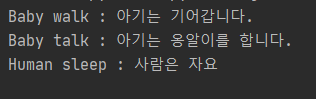
- Can an abstract class contain only abstract methods? => It can contain regular methods! If regular methods are included, they are inherited as-is without needing to be implemented separately in the child class, so they can be used immediately as methods. Let’s verify this through the example code below.
from abc import *


class Human(metaclass=ABCMeta):
    # 추상 메서드
    @abstractmethod
    def walk(self):
        print('Human walk : 사람은 걸어요')

    # 추상 메서드
    @abstractmethod
    def talk(self):
        pass

    # 일반 메서드
    def sleep(self):
        print('Human sleep : 사람은 자요')


# 자식 클래스 : 어른 클래스
class Adult(Human):
    def walk(self):
        print('Adult walk : 어른은 걷습니다.')


# 자식 클래스 : 아기 클래스
class Baby(Human):
    # 추상 메서드
    def walk(self):
        print('Baby walk : 아기는 기어갑니다.')

    def talk(self):
        print('Baby talk : 아기는 옹알이를 합니다.')


# 객체 생성
# human = Human() # error
# adult = Adult() # error
baby = Baby()

# 재정의한 추상 메서드
baby.walk()
baby.talk()

# 부모 클래스 메서드
baby.sleep()
Result
- Why use object-oriented programming?
-> It is difficult to assign tasks one by one as before (grunt-work coding)
-> Let’s categorize the roles of jobs (classes) and turn the tools (class variables) belonging to them, along with the skills that use and operate them, into sets!
-> It becomes possible to assign work efficiently by providing manuals according to the job or role
class 칠판닦이:
    성격 = "더러움" # 클래스 변수
    def __init__(self, 교실: Classrom):
        self.담당_교실 = 교실
        self.지우개_깨끗함 = 0 # 멤버 변수/ 인스턴스변수
        self.칠판_닦기()

    def 칠판_닦기(self):
        pass # 함수 안의 내용~~


칠판닦이_영수 = 칠판닦이(101호)    # 인스턴스는 클래스로 찍어낸 녀석들
칠판닦이_영수.지우개_깨끗함 = 1

칠판닦이_영희 = 칠판닦이(102호)

칠판닦이_영수.지우개_깨끗함 == 칠판닦이_영희.지우개_깨끗함

칠판닦이.성격 = '깨끗함'

칠판닦이_철수 = 칠판닦이(111)
칠판닦이_철수.성격

칠판닦이_영수.칠판_닦기()
I studied this code based on the https://www.youtube.com/watch?v=vrhIxBWSJ04 video.
10/7 Inheritance, Static methods, Abstract methods
Questions that came up while studying Q&A
1. What does it mean that self is missing?
-> If self or cls is missing, it is impossible to access the corresponding attributes because the object itself has not been specified. -> Difference in the ability to access arguments what if?)
- If self is present (meaning that an instance can be used) -> All methods and variables can be accessed and modified using the instance
- If cls is present -> All class variables and class methods can be used using the class
2. How to receive an instance variable from a constructor in a method
Conclusion
- To receive an instance variable from the constructor in a method, you do not receive it as a parameter of the method; you can use it directly as self.instanceVariableName in the method.
-> self.instanceVariableName can be used as an instance and is a variable that can be used in methods used as instances. -> A variable name received as a method parameter is a local variable within the method
How did I not know this?
Situation
There were too many test documents, so I created a separate file and made various methods in the classes.
class TEST_DOCUMENT_CODE_SPLITEER:
    # Here is test documents with all language that splitter can split for test.
    def __init__(
            self,
            PYTHON_TEST_DOCUMENT: Document = None
    ):
        self.PYTHON_TEST_DOCUMENT = PYTHON_TEST_DOCUMENT

    def PYTHON_TEST_DOCUMENT(self, PYTHON_TEST_DOCUMENT):
        if PYTHON_TEST_DOCUMENT is None:
            return Document(
                page_content="""
                            def hello_world():
                                print("Hello, World!")

                            # Call the function
                            hello_world()
                                """,
                metadata={
                    'source': 'test_source',
                    # Check whether the metadata_etc contains the multiple information from the TEST DOCUMENT metadatas or not.
                    'Data information': 'test for python code document',
                    'Data reference link': 'https://python.langchain.com/docs/modules/data_connection/document_transformers/text_splitters/code_splitter#python'
                }
            )
        else:
            return PYTHON_TEST_DOCUMENT
from test_document_for_code_splitter import Test_Document_Code_Splitter

# Here is test documents with all language that splitter can split for test.
# Which file do you want to test ?

# 왜 안됌???????? 똑같이 인스턴스 선언하고 매서드 불러왔는데
test_doc = Test_Document_Code_Splitter()
TEST_DOCUMENT = test_doc.PYTHON_TEST_DOCUMENT()
The above produces an error saying that PYTHON_TEST_DOCUMENT has no parameter.
I had definitely set the default value in the constructor in advance with PYTHON_TEST_DOCUMENT: Document = None,
and I made it an instance variable with self.PYTHON_TEST_DOCUMENT = PYTHON_TEST_DOCUMENT.
I thought that I had input the instance variable declared in the constructor as a method parameter with def PYTHON_TEST_DOCUMENT(self, PYTHON_TEST_DOCUMENT):.
Solution
=> The PYTHON_TEST_DOCUMENT in the method def PYTHON_TEST_DOCUMENT(self, PYTHON_TEST_DOCUMENT): above is a local variable within the method, so although it has the same name as the constructor’s self.PYTHON_TEST_DOCUMENT, it is an entirely different thing.
Therefore, change it to def PYTHON_TEST_DOCUMENT(self):,
and call the constructor’s instance variable in the method like this with if self.PYTHON_TEST_DOCUMENT is None:!
3. Reduce unnecessary repetition!
-
Repeated split and document creation every time a method is called
-
Regardless of which tokenizer name is selected, unnecessary other tokenizers are always downloaded and created, so instances continue to be made in the constructor
Always think about efficiency: is there any unnecessary repetition>?
References https://engineer-mole.tistory.com/99 https://www.youtube.com/watch?v=vrhIxBWSJ04 https://076923.github.io/posts/Python-37/ https://www.daleseo.com/python-class-methods-vs-static-methods/