Motivation
I am interested in how machine learning systems are actually applied and used. Therefore, driven by curiosity about design patterns for how machine learning systems are served, trained, and operated in real-world services, I want to investigate which Design patterns are applied.
🎯 GOAL
This is for workflows in which there is no dependency between the process and the prediction; in other words, to separate requests from inference so that the client does not need to wait for inference in its workflow. When the model is heavy and inference takes a long time, asynchronous workflows are increasingly being used to improve the performance of the overall system.
Detail
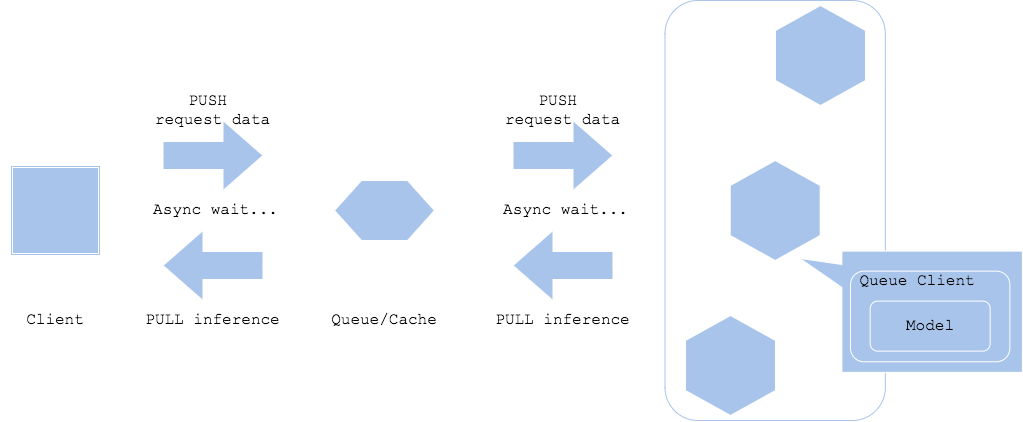
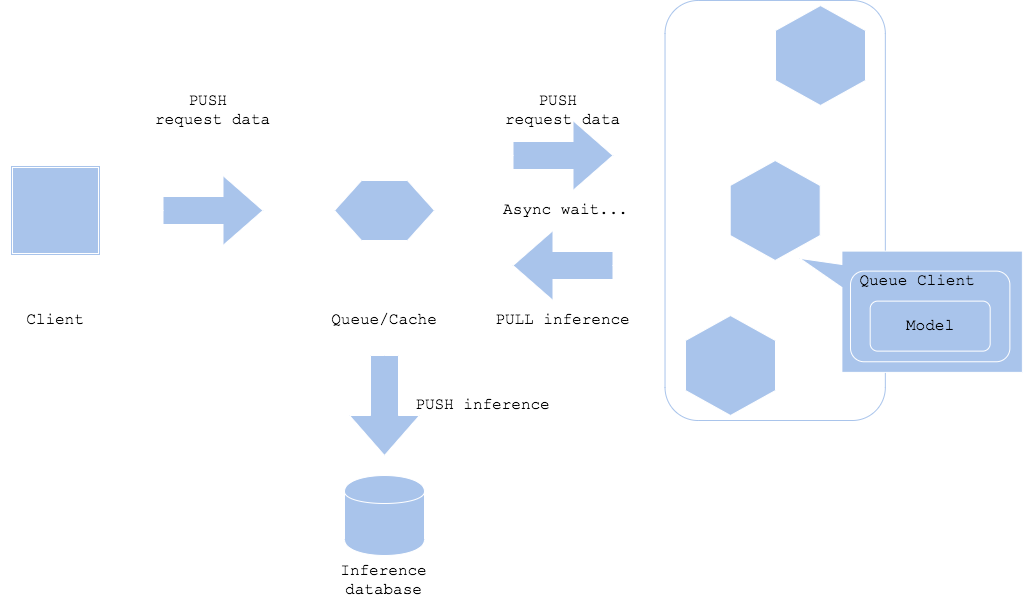
The asynchronous pattern places a queue such as Apache Kafka or a cache such as Redis Cache between the client and the prediction server to separate and asynchronously process prediction requests and prediction result retrieval. This prevents the client from having to wait for prediction latency. For the client to obtain a prediction, it must add polling to retrieve the result from the queue.
The asynchronous inference pattern also uses TF Serving, which was used in the synchronous inference pattern. The inference engine runs the InceptionV3 model, including preprocessing and postprocessing, through TF Serving. The inference request endpoint from the client is intermediated by a proxy built with FastAPI.
The proxy responds to an inference request with a job ID and registers the request data in Redis in the background. The request data registered in Redis is inferred by TF Serving in batches, and the inference result is stored back in Redis. When the client requests the job ID from the proxy, it can obtain the result after inference is complete.
 The architecture above has FastAPI, Redis, and a batch server between the client and the inference engine. Because of the asynchronous operation, the client does not need to stop working until inference is complete. However, as mentioned earlier, the client must
access the location where the result is stored regularly in order to obtain the inference result.
The architecture above has FastAPI, Redis, and a batch server between the client and the inference engine. Because of the asynchronous operation, the client does not need to stop working until inference is complete. However, as mentioned earlier, the client must
access the location where the result is stored regularly in order to obtain the inference result.
As shown in the figure above, because the asynchronous inference pattern is implemented by combining multiple resources, each resource can be built as an individual container and run using docker compose.
Pros and Cons
The advantage of this approach is that it separates the client from prediction, so the client does not have to wait for the prediction. However, its disadvantages are that it requires a queue, cache, or similar type of proxy, and that it is not suitable for real-time prediction.
UML
The asynchronous inference pattern can be implemented with multiple architectures depending on where the inference result is output. The inference result may be stored in a queue or cache, or it may be output by an entirely different system. In addition, the location where the inference result is output varies according to the system workflow. Although the inference result can be delivered directly to the client, this is not recommended because it requires an additional connection for the prediction server to return the result to the client, which can make the system more complex.
Code
Simple Example
The following is example code that implements an asynchronous pattern using Python’s asyncio library. This code asynchronously performs multiple data preprocessing tasks and then starts model training.
import asyncio
import time

async def preprocess_data(data):
    print(f"데이터 전처리 시작: {data}")
    await asyncio.sleep(2)  # 데이터 전처리 시뮬레이션
    print(f"데이터 전처리 완료: {data}")
    return f"전처리된 {data}"

async def train_model(preprocessed_data):
    print(f"모델 학습 시작: {preprocessed_data}")
    await asyncio.sleep(3)  # 모델 학습 시뮬레이션
    print(f"모델 학습 완료: {preprocessed_data}")
    return f"학습된 모델 ({preprocessed_data})"

async def main():
    raw_data = ["데이터1", "데이터2", "데이터3"]

    # 데이터 전처리를 비동기적으로 수행
    preprocessed_data_tasks = [preprocess_data(data) for data in raw_data]
    preprocessed_data = await asyncio.gather(*preprocessed_data_tasks)

    # 모델 학습을 비동기적으로 수행
    train_model_tasks = [train_model(data) for data in preprocessed_data]
    trained_models = await asyncio.gather(*train_model_tasks)

    print("모든 작업 완료")
    for model in trained_models:
        print(model)

# 비동기 루프 실행
asyncio.run(main())
- preprocess_data function: This is an asynchronous function that simulates data preprocessing.
- It waits for 2 seconds using await asyncio.sleep(2).
- train_model function: This is an asynchronous function that trains a model using the preprocessed data. It waits for 3 seconds using await asyncio.sleep(3).
- main function: It defines the raw data as a list.
- It asynchronously calls the preprocess_data function to preprocess all the data.
- It asynchronously calls the train_model function to train the model using the preprocessed data.
Example Code for UML
Source of code and explanation
import base64
import io
import uuid
from logging import getLogger
from typing import Any, Dict
import requests
from fastapi import APIRouter, BackgroundTasks
from PIL import Image
from src.app.backend import background_job, store_data_job
from src.app.backend.data import Data
from src.configurations import ModelConfigurations
logger = getLogger(__name__)
router = APIRouter()
# health check
@router.get("/health")
def health() -> Dict[str, str]:
        return {"health", "ok"}
# 모델에 대한 metadata를 TF Serving에 get 요청
@router.get("/metadata")
def metadata() -> Dict[str, Any]:
    model_spec_name = ModelConfigurations.model_spec_name
    address = ModelConfigurations.address
    port = ModelConfigurations.rest_port
    serving_address = f"http://{address}:{port}/v1/models/{model_spec_name}/versions/0/metadata"  # TFServing 엔드포인트 규칙
    response = requests.get(serving_address)
    return response.json()
# 라벨 인덱스와 값을 return
@router.get('/label')
def label() -> Dict[int, str]:
    return ModelConfigurations.labels
@router.get('/predict/test')
def predict_test(background_tasks: BackgroundTasks) -> Dict[str, str]:
    job_id = str(uuid.uuid4())[:6]
    data = Data()
    data.image_data = ModelConfigurations.sample_image
    background_job.save_data_job(data.image_data, job_id, background_tasks, True)
    return {'job_id': job_id}
# 이미지를 redis에 새로 등록 -> 추론은 background에서 이미 loop를 돌면서 추론중
@router.get('/predict')
def predict(data: Data, background_tasks: BackgroundTasks) -> Dict[str, str]:
    image = base64.b64decode(str(data.image_data))
    io_bytes = io.BytesIO(image)
    data.image_data = Image.open(io_bytes)
    job_id = str(uuid.uuid4())[:6]
    background_job.save_data_job(
        data=data.image_data,
        job_id=job_id,
        background_tasks=background_tasks,
        enqueue=True
    )
    return {'job_id': job_id}
# 해당 job의 결과값 get
@router.get("/job/{job_id}")
def prediction_result(job_id: str) -> Dict[str, Dict[str, str]]:
    result = {job_id: {'prediction': ""}}
    data = store_data_job.get_data_redis(job_id)
    result[job_id]["prediction"] = data
return result- The proxy consists of Gunicorn and FastAPI, just like the web singleton pattern. The main endpoints are /predict/test, /predict, and /job/{job_id}. /predict/test is used when testing with internal data, and /predict is used when receiving client requests. The endpoint for requesting inference results is /job/{job_id}.
- When the client sends a request to the /predict endpoint, the image is converted to Pillow format, after which the data is stored in Redis in the background and the job_id is registered in the queue. Background processing can be scheduled to run after responding to the request by using FastAPI’s BackgroundTasks.
- The inference result for the corresponding job_id registered in Redis can be received through the /job/{job_id} endpoint.
import base64
import io
import logging
from typing import Any, Dict
from PIL import Image
from src.app.backend.redis_client import redis_client
logger = logging.getLogger(__name__)
# 큐에 등록할 키 작성
def make_image_key(key: str) -> str:
    return f"{key}_image"
# 큐 등록
def left_push_queue(queue_name: str, key: str) -> bool:
    try:
        redis_client.lpush(queue_name, key)
        return True
    except Exception:
        return False
# 큐 취득
def right_pop_queue(queue_name: str) -> Any:
    if redis_client.llen(queue_name) > 0:
        return redis_client.rpop(queue_name)
    else:
        return None
# Redis에 데이터 등록
def set_data_redis(key: str, value: str) -> bool:
    redis_client.set(key, value)
    return True
# Redis로부터 데이터 취득
def get_data_redis(key: str) -> Any:
    data = redis_client.get(key)
    return data
# Redis에 이미지 데이터 등록
def set_image_redis(key:str, image: Image.Image) -> str:
    byte_io = io.BytesIO()
    image.save(byte_io, format=image.format)
    image_key = make_image_key(key)
    encoded = base64.b64encode(byte_io.getvalue())
    redis_client.set(image_key, encoded)
    return image_key
# Redis로부터 이미지 데이터 취득
def get_image_redis(key:str) -> Image.Image:
    redis_data = redis_client.get(key)
    decoded = base64.b64decode(redis_data)
    io_bytes = io.BytesIO(decoded)
    image = Image.open(io_bytes)
    return image
# Redis에 데이터와 작업 ID 등
def save_image_redis_job(job_id: str, image: Image.Image) -> bool:
    set_image_redis(job_id, image)
    redis_client.set(job_id, "")
return True-
This script defines the behavior of the Redis client. It includes a function for registering a job ID in the queue or removing a job ID from the queue, a set function for registering image data in Redis together with the image job ID, and a get function for retrieving data for inference.
-
Only job IDs are registered in the queue, and logic is implemented to load data stored in Redis using the job IDs registered in the queue.
-
This code defines the behavior of the Redis client. It includes a function for registering a job ID in the queue or removing it from the queue, a set function for storing image data in Redis together with the job ID, and a get function for retrieving data for inference.
-
Only job IDs are registered in the queue, and logic is implemented to load data stored in Redis using the job IDs registered in the queue.
import asyncio
import base64
import io
import os
from concurrent.futures import ProcessPoolExecutor
from logging import DEBUG, Formatter, StreamHandler, getLogger
from time import sleep
import grpc
from src.app.backend import request_inception_v3, store_data_job
from src.configurations import CacheConfigurations, ModelConfigurations
from tensorflow_serving.apis import prediction_service_pb2_grpc
log_format = Formatter("%(asctime)s %(name)s [%(levelname)s] %(message)s")
logger = getLogger("prediction_batch")
stdout_handler = StreamHandler()
stdout_handler.setFormatter(log_format)
logger.addHandler(stdout_handler)
logger.setLevel(DEBUG)
# 큐가 존재하면 추론을 실행
def _trigger_prediction_if_queue(stub: prediction_service_pb2_grpc.PredictionServiceStub):
    # queue 에는 job_id만 담고 실제 데이터(이미지)는 redis 에 담음
    job_id = store_data_job.right_pop_queue(CacheConfigurations.queue_name)  # None or job_id
    logger.info(f"predict job_id: {job_id}")
    if job_id is not None:
        data = store_data_job.get_data_redis(job_id)
        if data != "":  # 공백이 아니라면 이미 예측값이 저장되어 있다는 의미
            return True
        # Job id는 있지만 data(추론결과)가 없는 경우는 추론을 수행 해야 함
        image_key = store_data_job.make_image_key(job_id)
        image_data = store_data_job.get_data_redis(image_key)  # 이미지 id로 부터 이미지 취득
        decoded = base64.b64decode(image_data)
        io_bytes = io.BytesIO(decoded)
        prediction = request_inception_v3.request_grpc(
            stub=stub,
            image=io_bytes.read(),
            model_spec_name=ModelConfigurations.model_spec_name,
            signature_name=ModelConfigurations.signature_name,
            timeout_second=5
        )
        if prediction is not None:  # 응답이 성공적으로 오면
            logger.info(f"{job_id} {prediction}")
            store_data_job.set_data_redis(job_id, prediction)  # job id에 예측값 등록
        else:
            store_data_job.left_push_queue(CacheConfigurations.queue_name, job_id)  # 응답이 지연된 경우나 오지 않은 경우 다시 큐에 등록
def _loop():
    serving_address = f"{ModelConfigurations.address}:{ModelConfigurations.grpc_port}"
    channel = grpc.insecure_channel(serving_address)
    stub = prediction_service_pb2_grpc.PredictionServiceStub(channel)
    while True:
        sleep(1)
        _trigger_prediction_if_queue(stub=stub)
# 멀티 프로세스로 기동
def prediction_loop(num_procs: int=2):
    excutor = ProcessPoolExecutor(num_procs)  # 병렬 연산을 위한 ProcessPoolExecutor
    loop = asyncio.get_event_loop()
    for _ in range(num_procs):
        asyncio.ensure_future(loop.run_in_executor(excutor, _loop()))
    loop.run_forever()
def main():
    NUM_PROCS = int(os.getenv("NUM_PROCS", 2))
    prediction_loop(NUM_PROCS)
if __name__ == '__main__':
    logger.info('start backend')
main()- Start the container that runs this script for batch processing. This container runs an infinite loop, pops the last job_id from the queue, performs inference if there is no prediction result for that job_id, and stores the result in Redis.
- The batch server uses Python’s ProcessPoolExecutor for parallel processing in order to run as multiple processes.
There are four images (proxy, batch processing (backend), inference engine, and Redis) to use in the asynchronous inference pattern, and because the execution order is important, a docker-compose.yaml file is written to manage them.
version: "3"
services:
  asynchronous_proxy:
    container_name: asynchronous_proxy
    image: tjems6498/ml-system-in-actions:asynchronous_pattern_asynchronous_proxy_0.0.1
    restart: always
    environment:
      - PLATFORM=docker_compose
      - QUEUE_NAME=tfs_queue
      - API_ADDRESS=imagenet_inception_v3
    ports:
      - "8400:8000"
    command: ./run.sh
    depends_on:
      - redis
      - imagenet_inception_v3
      - asynchronous_backend
  imagenet_inception_v3:
    container_name: imagenet_inception_v3
    image: tjems6498/ml-system-in-actions:asynchronous_pattern_imagenet_inception_v3_0.0.1
    restart: always
    environment:
      - PORT=8500
      - REST_API_PORT=8501
    ports:
      - "8500:8500"
      - "8501:8501"
    entrypoint: ["/usr/bin/tf_serving_entrypoint.sh"]
  asynchronous_backend:
    container_name: asynchronous_backend
    image: tjems6498/ml-system-in-actions:asynchronous_pattern_asynchronous_backend_0.0.1
    restart: always
    environment:
      - PLATFORM=docker_compose
      - QUEUE_NAME=tfs_queue
      - API_ADDRESS=imagenet_inception_v3
    entrypoint: ["python", "-m", "src.app.backend.prediction_batch"]
    depends_on:
      - redis
  redis:
    container_name: asynchronous_redis
    image: "redis:latest"
    ports:
      - "6379:6379"
After the Redis and inference engine containers are started first, the batch server (backend) and proxy are started sequentially. When a request is sent to the /predict/test endpoint, the job ID and image data are registered in the queue and Redis. The batch server polls Redis every second to retrieve tasks waiting for inference and sends requests to the TF Serving container. When inference is complete, the predicted value for the corresponding job ID is registered. The client can send a request to the job/{job id} endpoint to obtain the inference result. If inference is not yet complete, an empty string is returned; if inference is complete, the predicted label is returned.
Note