What is merge?
It is the process of merging the contents of a newly created branch into the main branch. By making changes in the newly created branch, the main branch
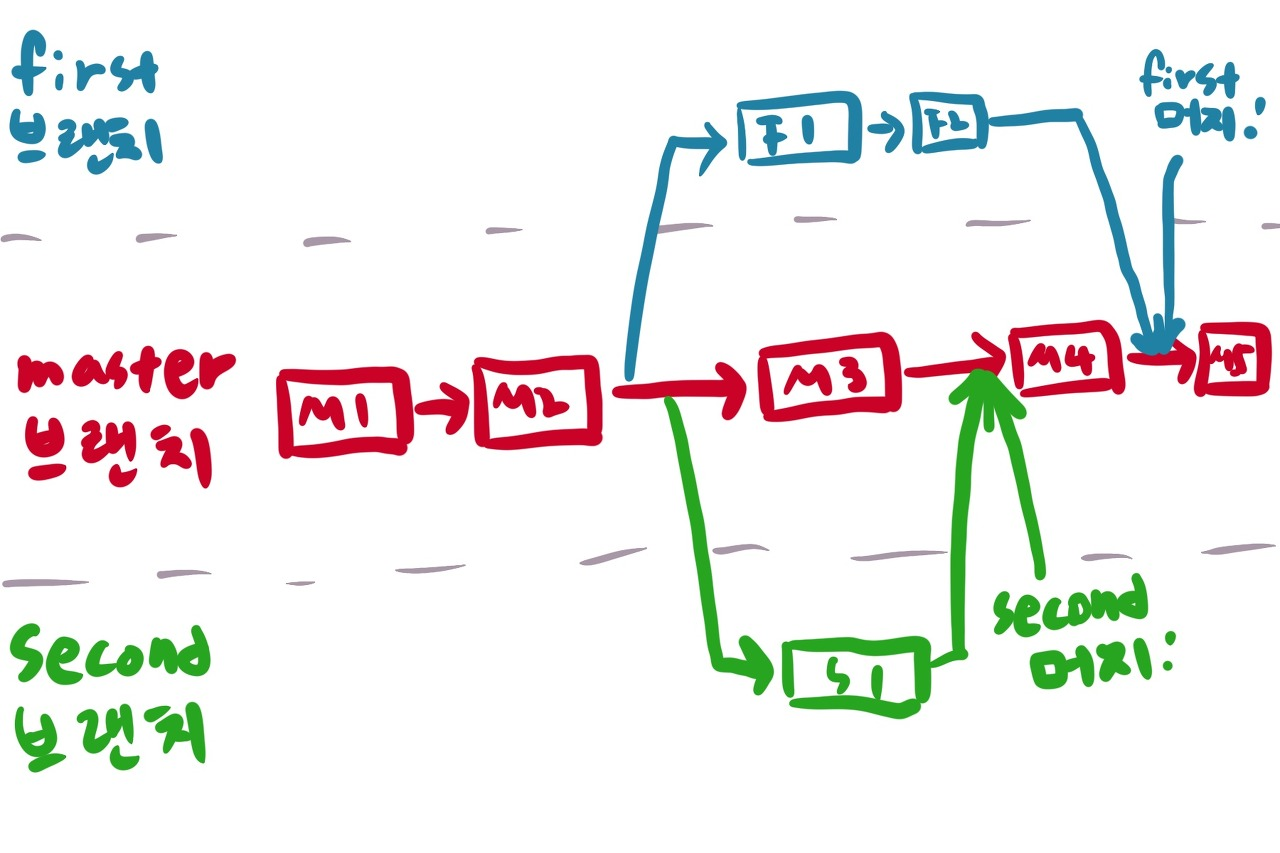
How to merge the GitHub master branch into the main branch
- Main commands
- Switch branches (when switching by force, checkout -f main)
# git checkout main- Merge branches (move to the target branch using checkout, then specify the branch to merge—the example below shows merging the test branch into the main branch)
# git merge testIn case of a conflict during merge
Cause
- Merge conflicts occur when the same line in a file is changed or when one person edits a file while another user deletes the same file.
- A conflict occurs if the file names are the same during the merge process.
- If the files are different, they are always merged automatically.
- Even if the files are the same, they are merged automatically if the modified parts are different. (One of the really important reasons to use version control) Solution
1. Edit manually
2. Cancel the merge operation
Tip)
-> After merging, the changes are reflected only locally, so you need to push the contents of the main branch separately for them to be reflected on GitHub.
-> Whenever possible, merge on GitHub!
How to test
Try testing it using the method in this link
Image URL: http://luckcrow.egloos.com/2631202