Classification
What is Classification?
AI that derives the result of which class a given input value belongs to
Types of Models
- Tree-based
- DecisionTree
- RandomForest
- …
- Probability model-based
- Naive Bayes classifier…
- Decision boundary-based
- Linear classifier
- Logistic regression classifier
- SVM -…
- Neural networks
- Perceptron
- Deep learning models…
Decision Tree model structure
What is a DecisionTree?
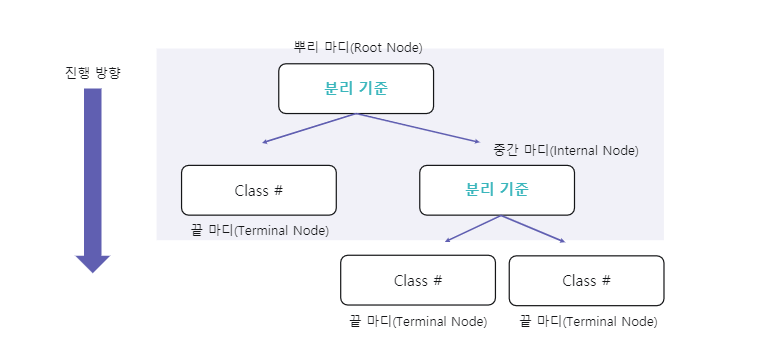
- A model that finds the answer through specific questions (proceeding downward from the root node at the top to the final leaf node)
Impurity
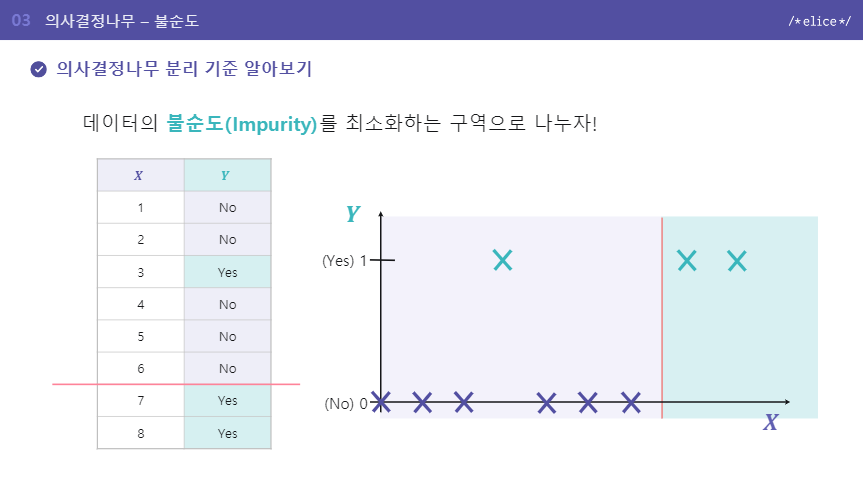
What is impurity?
- The degree to which different data points are mixed together
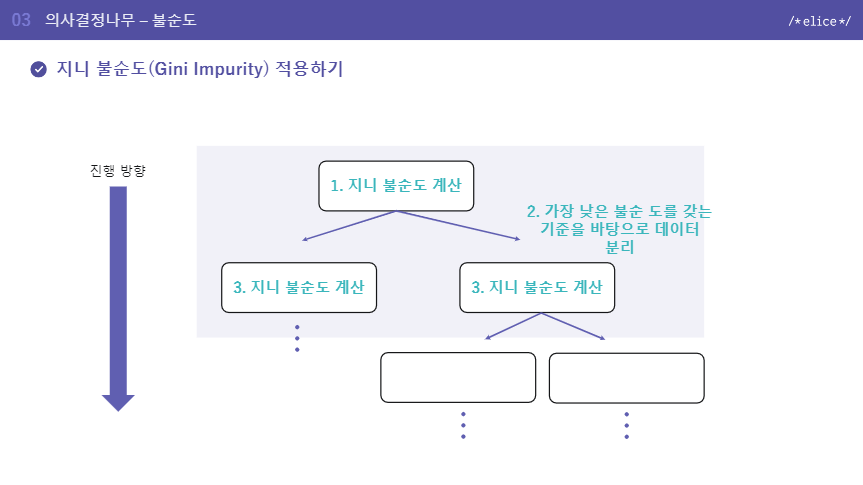
How to measure impurity - Gini Impurity
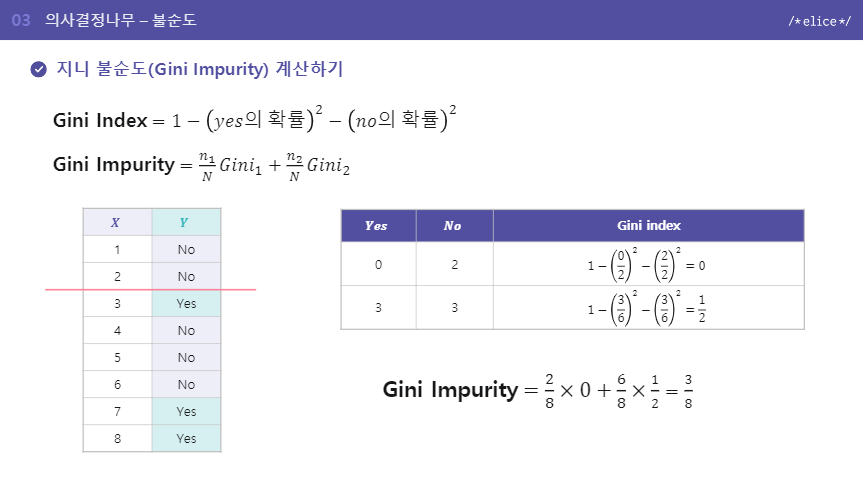
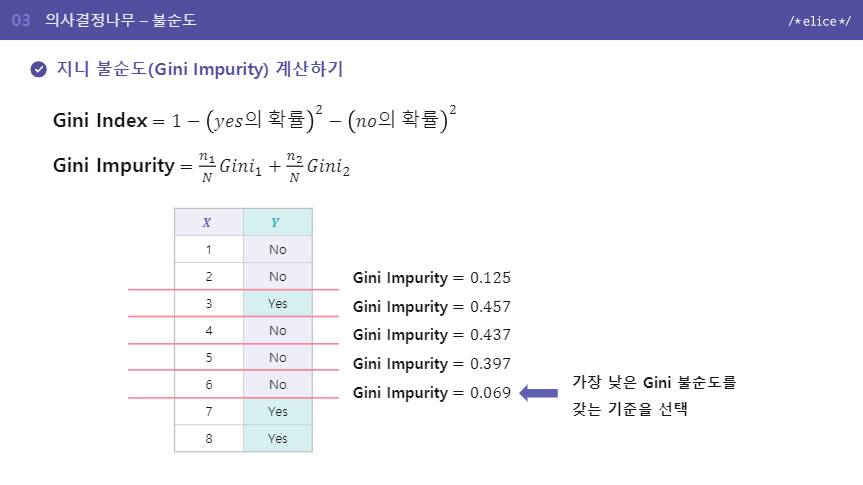
Gini Index A method of calculating diversity by subtracting the proportions of data belonging to each specific class within the region
Gini impurity Let’s refer to the example
Trade-off of DecisionTree depth
- The greater the depth, the more finely the data can be divided.
- A model that is too deep -> Overfitting -> Should be avoided
cf) overfitting
- If predictions are made too finely for the training data, performance on the test set may decrease. -> When we drew a line here to classify the data, we found that accuracy was higher for another dataset when the line was drawn at a completely different point.
DTmodel = DecisionTreeClassifier(max_depth=5)
DTmodel.fit(train_X, train_Y)
# max depth를 하이퍼파라미터튜닝할때는 오버피팅이되는가를 따로 체크해봐야함.
Features of DecisionTree
- Results are intuitive and easy to interpret
- The deeper the depth, the greater the overfitting problem
- Tree operations are very fast
Logistic Regression
What is Logistic Regression?
It is a model for solving Binary Classification problems. It uses the sigmoid (logistic) function to make the result converge between a minimum of 0 and a maximum of 1.
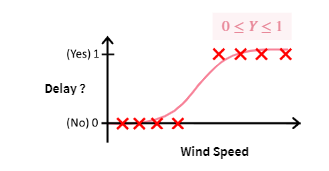
cf) sigmoid function
- One of the types of functions, shaped like an S-shaped curve
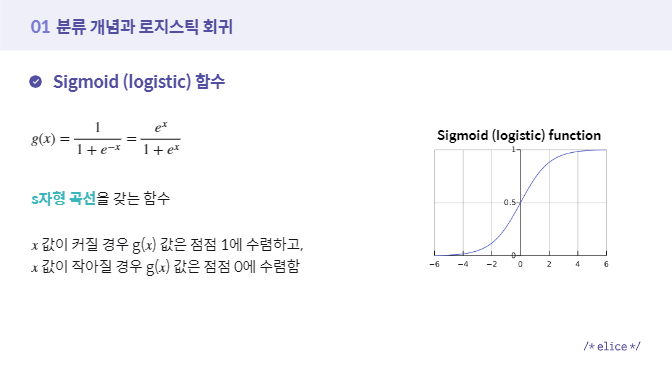
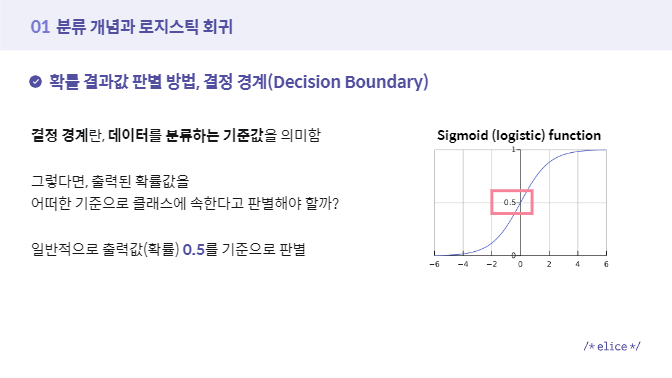
cf2) Decision Boundary
- The criterion for classifying data
Why use Logistic Regression?
Since a general Regression algorithm cannot be used as-is for a classification problem, Linear Regression is modified so that it outputs only values between 0 and 1, representing the probability of belonging to a given class.
Features of Logistic Regression
- Used for Binary classification
- Retains the characteristics of Linear Regression
Support Vector Machine (SVM)
- A model that defines the Decision Boundary, that is, the boundary line used to classify data
-> Problem definition: A Binary Classification Problem classified into two outcomes, positive and negative
ex) Determining whether a delay has occurred, detecting fraudulent transactions
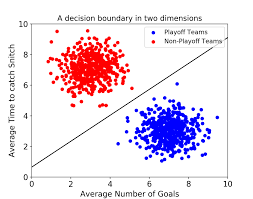
Optimal Decision Boundary
- Being as far away as possible from the data clusters
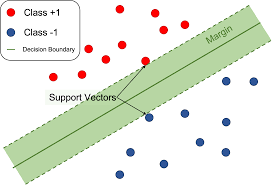
What is a Support Vector?
- The data points closest to the Decision Boundary
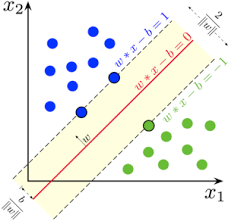
Margin
- The distance between the Decision Boundary and the support vector
- The Decision Boundary is drawn in a way that maximizes the margin
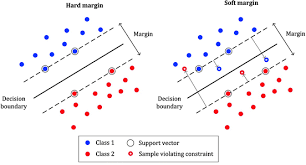
- Classified into hard margin and soft margin depending on the allowable range for outliers
Features of SVM
- Both linear and nonlinear classification are possible
- Produces high-performance results even with high-dimensional data
- Can also be applied to regression
Naive Bayes Classification
- A probabilistic statistical classification algorithm based on Bayes’ theorem, assuming that each feature is independent and does not affect the others
- Applications: classifying spam and legitimate emails, text classification, sentiment analysis, recommendation systems
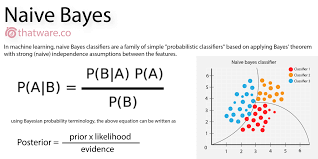
cf) What is Bayes’ theorem?
- A formula for finding conditional probability when a condition, such as data, is given
Example - Spam email
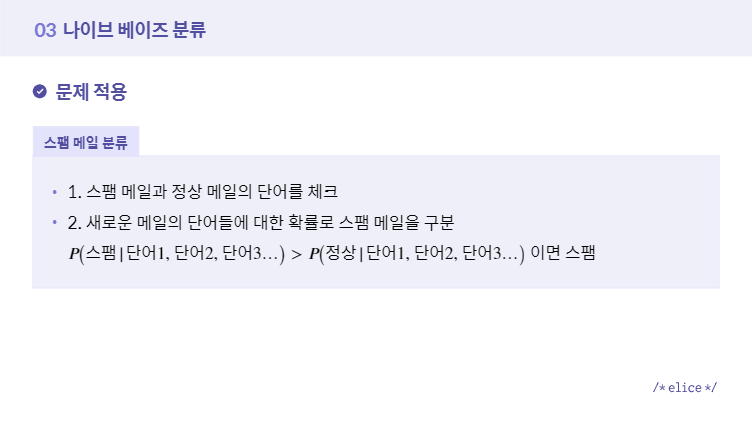
Implementation
- Calculate each probability in the code and implement it using Naive Bayes’ theorem.
- Use the sklearn Naive Bayes library
1. Calculate each one
import numpy as np

"""
1. "확인" 이라는 키워드가 등장했을 때
    해당 메일이 스팸 메일인지 정상 메일인지
    판별하기 위한 함수를 구현합니다.
"""
def bayes_theorem():
    # 1. P(“스팸 메일”) 의 확률을 구하세요.
    p_spam = float(8/20)

    # 2. P(“확인” | “스팸 메일”) 의 확률을 구하세요.
    p_confirm_spam = float(5/8)

    # 3. P(“정상 메일”) 의 확률을 구하세요.
    p_ham = float(12/20)

    # 4. P(“확인” | "정상 메일" ) 의 확률을 구하세요.
    p_confirm_ham = float(2/12)

    # 5. P( "스팸 메일" | "확인" ) 의 확률을 구하세요.
    p_spam_confirm = float(5/7)

    # 6. P( "정상 메일" | "확인" ) 의 확률을 구하세요.
    p_ham_confirm = float(2/7)

    return p_spam_confirm, p_ham_confirm

def main():

    p_spam_confirm, p_ham_confirm = bayes_theorem()

    print("P(spam|confirm) = ",p_spam_confirm, "\nP(ham|confirm) = ",p_ham_confirm, "\n")

    # 두 값을 비교하여 확인 키워드가 스팸에 가까운지 정상 메일에 가까운지 확인합니다.
    value = [p_spam_confirm, p_ham_confirm]

    if p_spam_confirm > p_ham_confirm:
        print( round(value[0] * 100, 2), "% 의 확률로 스팸 메일에 가깝습니다.")
    else :
        print( round(value[1] * 100, 2), "% 의 확률로 일반 메일에 가깝습니다.")


if __name__ == "__main__":
    main()
2. Use the library
from sklearn.datasets import load_wine

from sklearn.model_selection import train_test_split
from sklearn.naive_bayes import GaussianNB
from sklearn.metrics import accuracy_score

"""
1. 데이터를 불러오고,
   불러온 데이터를 학습용, 테스트용 데이터로
   분리하여 반환하는 함수를 구현합니다.

   Step01. 사이킷런에 저장되어 있는 데이터를
           (X, y) 형태로 불러옵니다.

   Step02. 불러온 데이터를
           학습용 데이터와 테스트용 데이터로 분리합니다.

           학습용 데이터 : 80%, 테스트용 데이터 : 20%,

           일관된 결과 확인을 위해 random_state를
           0 으로 설정합니다.
"""
def load_data():

    X, y = load_wine(return_X_y = True)

    print("데이터 확인해보기 :\n", X[:1])

    train_X, test_X, train_y, test_y = train_test_split(X,y, test_size=0.20, random_state = 0)

    return train_X, test_X, train_y, test_y

"""
2. 가우시안 나이브 베이즈 모델을 불러오고,
   학습을 진행한 후 테스트 데이터에 대한
   예측값을 반환하는 함수를 구현합니다.

   Step01. 가우시안 나이브 베이즈 모델을 정의합니다.

   Step02. 학습용 데이터에 대해 모델을 학습시킵니다.

   Step03. 테스트 데이터에 대한 모델 예측을 수행합니다.
"""
def Gaussian_NB(train_X, test_X, train_y, test_y):

    model = GaussianNB()

    model.fit(train_X,train_y)

    predicted = model.predict(test_X)

    return predicted

# 데이터 불러오기, 모델 예측 결과를 확인할 수 있는 함수입니다.
def main():

    train_X, test_X, train_y, test_y = load_data()

    predicted = Gaussian_NB(train_X, test_X, train_y, test_y)

    ## 모델 정확도를 통해 분류 성능을 확인해봅니다.
    print("\nModel Accuracy : ")
    print(accuracy_score(test_y, predicted))

if __name__ == "__main__":
    main()
Source of code: 2022 Military Service Members’ SW/AI Competency Enhancement Intermediate Project Course
Features
- If each feature is independent, it performs better than other classification methods and requires less training data
- If the features are not independent and affect one another, the reliability of the classification results decreases
- Normal prediction is not possible for data belonging to categories not present in the training data
KNN (K-Nearest Neighbor)
- Predicts new data based on information from the k nearest neighbors among the existing data
- ex) Classify existing customers based on customer-rated movie ratings, and classify newly acquired customers according to the criteria
Principle
- Classification is based on the number of neighbors within a nearby distance according to the configured k value
- When new customer data is entered, the class changes depending on the value of k.
Features
- Intuitive, uncomplicated, and easy to interpret
- Performance depends on the choice of k
- A lazy model that requires little training
cf) knn and kmeans differ in purpose: classification and clustering, respectively. Supplementary explanation link: https://velog.io/@jhlee508/%EB%A8%B8%EC%8B%A0%EB%9F%AC%EB%8B%9D-K-%ED%8F%89%EA%B7%A0K-Means-%EC%95%8C%EA%B3%A0%EB%A6%AC%EC%A6%98
Evaluation Metrics
Types
- Confusion matrix
- Accuracy
- Precision
- Recall
Confusion matrix
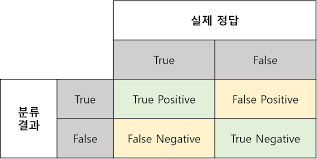
True Positive: Predicting a value that is actually Positive as Positive (correct) True Negative: Predicting a value that is actually Negative as Negative (correct)
False Positive: Predicting a value that is actually Negative as Positive (incorrect) - Type I error False Negative: Predicting a value that is actually Positive as Negative (incorrect) - Type II error
Accuracy
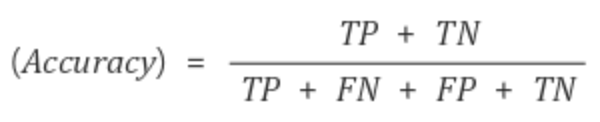
- The proportion of correctly classified data among all data
- Generally used as a primary evaluation method in classification
- If the class proportions are imbalanced, the reliability of the evaluation metric may be compromised
- Use: How accurately did the model classify the data?
Precision & Recall
#### Precision
- The proportion of data that is actually positive among the data classified as positive by the model - Use: When Negative is important (Used when data that is actually Negative must not be judged as Positive!)
- ex) Spam email classification -> If a regular email is incorrectly predicted as spam (Positive), an important email may not be delivered.
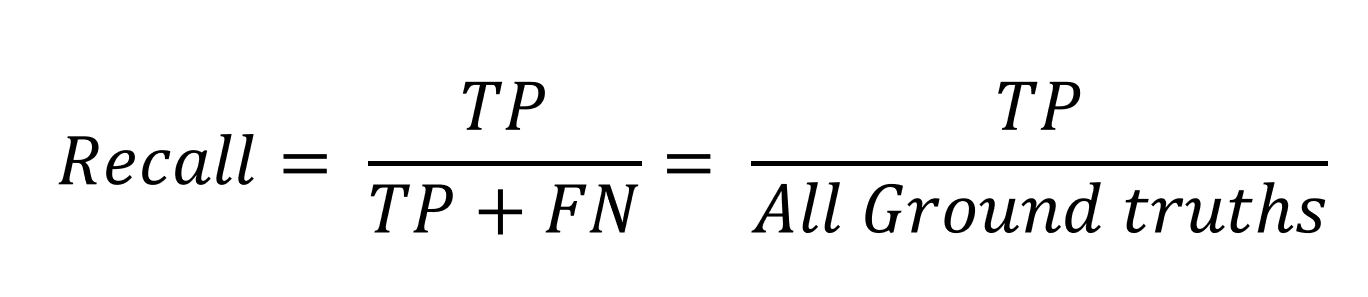
Recall/TPR

- The proportion of data classified as positive by the model among data that is actually positive - Use: When Positive is important (Used when data that is actually Positive must not be judged as Negative!)
- ex) If a malignant tumor (Positive) is incorrectly predicted as a benign tumor (Negative), treatment may not be received in time, putting the person’s life at risk.
Sources
- Photo of the first decision tree structure: 2022 Military Service Members’ SW/AI Competency Enhancement Program, Classification Unit https://military22.elice.io/courses/26526/lectures/204994/materials/12
- Content reference: 2022 Military Service Members’ SW/AI Competency Enhancement Program, Classification Unit
- Confusion matrix photo: https://eunsukimme.github.io/ml/2019/10/21/Accuracy-Recall-Precision-F1-score/
- Accuracy formula photo:https://wooono.tistory.com/232
- Precision formula: https://ctkim.tistory.com/79
- Recall formula: http://www.gisdeveloper.co.kr/?p=8146
- Source of Kkojimo photo:https://pokemon.fandom.com/ko/wiki/%EA%BC%AC%EC%A7%80%EB%AA%A8_(%ED%8F%AC%EC%BC%93%EB%AA%AC)
- SVM model photo https://hleecaster.com/ml-svm-concept/
- Logistic Regression model explanation photos: 2022 Military Service Members’ SW/AI Competency Enhancement Program, Classification Unit https://military22.elice.io/courses/26528/lectures/204997/materials/13
- Support Vector photo: https://sjpyo.tistory.com/m/40
- hard/soft margin: https://ankitnitjsr13.medium.com/math-behind-svm-support-vector-machine-864e58977fdb